Customer laptop test
A short real-machine proof clip showing the USB workflow, scan, safe actions, and handoff flow.
For Windows Repair Technicians
TechBuddy is a Windows PC diagnostic tool that turns a customer laptop into a professional health check in minutes, with safe fixes, approved app installs, and a customer-ready report.
The problem
You check the same basics again and again, then explain the result verbally. TechBuddy turns that intake into a repeatable laptop repair technician tool workflow with evidence.
RAM, disk, startup apps, network, security, drivers, and event logs all take time to check by hand.
The customer hears the diagnosis, but has nothing professional to keep or share.
A report with evidence makes your work easier to trust and easier to charge for.
The customer sees what TechBuddy checks before the session starts.
Quick Check gives basics. Full Health Check creates the complete 6-section diagnosis.
Fixes ask permission, app installs use approved winget IDs, and reports are saved locally.
How it works
No cloud account. No training model. No broad AI chatbot. Just the practical USB diagnostic tool Windows repair technicians need for intake work.
Run TechBuddy.exe, get owner consent, and enter technician/shop name for the report.
about 30 secondsRun Quick Check or Full Health Check. Safe fixes explain the action and ask before changing anything.
about 5 minutesSave a customer service report and technician guide with findings, notes, privacy statement, and next steps.
about 2 minutesWatch TechBuddy
Start with the polished product walkthrough, then see real laptop testing and the updated report/guide output.
Open the dedicated TechBuddy demo watch page
A short real-machine proof clip showing the USB workflow, scan, safe actions, and handoff flow.
The updated screen recording showing the refreshed service report and technician work guide output.
The report
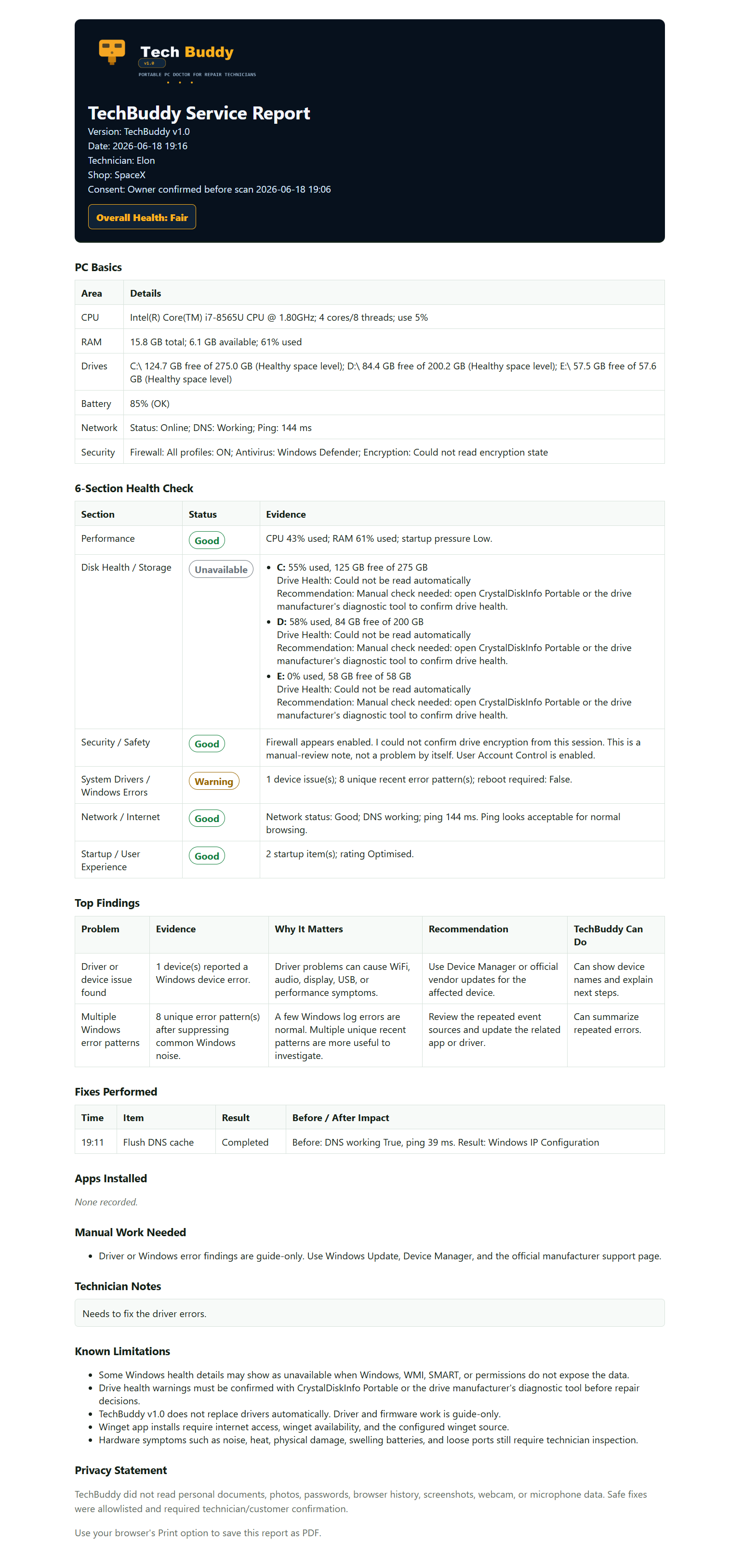
TechBuddy generates local HTML reports that can be saved as PDF from the browser, with clear findings, evidence, technician notes, privacy wording, and next steps.
A customer-ready summary with PC basics, health checks, top findings, fixes performed, notes, limitations, and privacy wording.
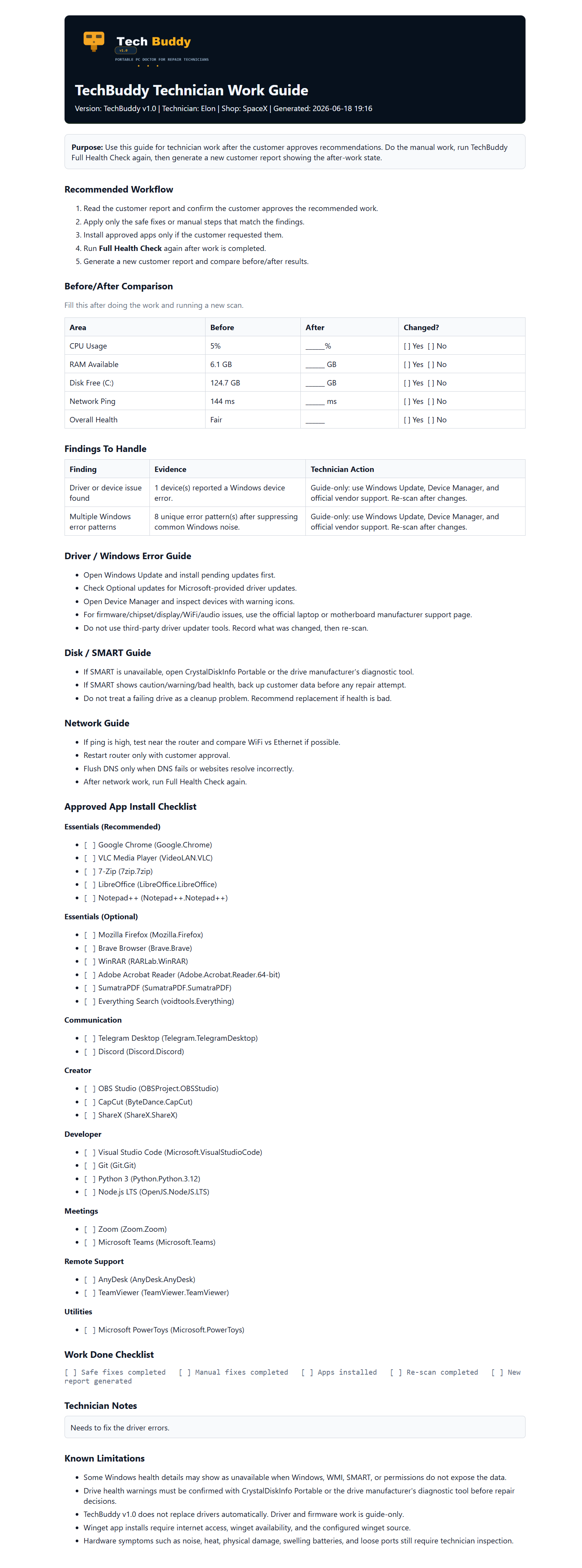
A practical after-scan guide with workflow steps, before/after comparison, findings to handle, app checklist, and work completion notes.
Reports are generated locally on your machine — your data never leaves your PC.



Problem, evidence, why it matters, recommendation, and what TechBuddy can do.
Includes before/after table, manual work checklist, app checklist, and driver guidance.
Technician and shop name appear on the report without storing them permanently.
Read the Windows PC health check guide to see the manual process TechBuddy speeds up.
What's included
Fast read-only basics: CPU, RAM, drives, battery, network, startup count, and temp estimate.
read-onlyWindows health check software for six sections: performance, disk, security, drivers/errors, network, and startup/user experience.
6 sectionsFlush DNS, clear old temp files, reset network stack, disable startup item, set balanced power plan.
asks permissionInstalls common technician apps through approved winget IDs when internet is available.
wingetDriver and firmware issues stay guide-only: Windows Update, Device Manager, official vendor support.
guide-onlyHTML reports save beside the app and can be printed or saved as PDF from the browser.
HTML/PDF-readyWho it's for
Standardize intake, show proof, and make every job feel documented.
Walk into a client site with one USB and leave behind a professional report.
Run the same check on multiple laptops and keep consistent records.
Stop guessing when family or friends ask why their laptop is slow.
Pricing
No subscription. No cloud account. Buy once, put it on your USB, and use it on jobs.
TechBuddy v1.0
One-time payment. Instant download after purchase.
FAQ
Yes for scanning, reports, and safe fixes. Internet is only needed for winget app installs, and TechBuddy clearly warns you before that workflow.
No. TechBuddy does not read documents, photos, passwords, browser history, screenshots, webcam, or microphone data.
The report says drive health could not be read automatically and recommends CrystalDiskInfo Portable or the manufacturer's diagnostic tool.
No. Driver and firmware work is guide-only in v1. TechBuddy points the technician to Windows Update, Device Manager, and official vendor support.
TechBuddy v1 targets Windows 10 and Windows 11. Some deep checks may show unavailable if Windows or permissions do not expose the data.
TechBuddy shows the problem, evidence, why it matters, and recommended next step. It only runs allowlisted safe fixes after permission.
TechBuddy v1.0 is focused on one job: helping technicians run a USB diagnostic tool Windows workflow, explain findings, fix safely, install requested apps, and hand over proof.
Get TechBuddy - $39